

Trading has always been a staple in all Pokemon games. Even in the mid-90s, kids had been linking their Game Boys to trade or battle.
Trading is also a method of evolving some Pokemon, and nowadays, you can do it easily through the internet. That being said, you can actually trade with yourself when you use the Visual Boy Advance.
Trading cables and third-party software won’t be required for this guide. Just have your VBA ready, and we’ll teach you how to trade Pokemon in Visual Boy Advance.
We’ll tell you all the information and steps necessary to trade with yourself.
More emulator guides:
- How To Trade Pokemon In MyBoy
- How To Fix White Screen On Visual Boy Advance
- How to Trade Pokemon on MelonDS
- How To Fix “1m sub-circuit board is not installed” Error on VBA and MyBoy

Things You Need to Do Before Trading
1. Have the Latest Visual Boy Advance Version
There might be several older versions of the VBA where the features needed to do a self-trade aren’t available.
It shouldn’t be that hard; just head to the main website for the VBA, download the version that you want, and you’re ready to go. There’s also a modern continuation of Visual Boy Advance, called VBA-M, and there shouldn’t be much difference in the procedure if you prefer using it.
Saves can be imported between versions of the VBA anyway, so you don’t need to start a new game.
2. Abide by the Trading Rules for Each Game
The Game Boy Advance has the Gen 3 games, such as Pokemon FireRed, LeafGreen, Ruby, Sapphire, and Emerald. There are rules that have to be followed before trading, and they are listed below:
- Trading between Pokemon FireRed and LeafGreen: As soon as you can access the second floor of the Pokemon Center, you can trade right away.
- Trading between Pokemon Ruby, Sapphire, and Emerald: Much like FR and LG, these three games can automatically trade when access to the second-floor trading NPCs is available.
- Trading between Pokemon FireRed/LeafGreen and Pokemon Ruby/Sapphire/Emerald: This is where one of the complications will begin, and that is trading between Pokemon FR/LG and R/S/E. Pokemon FR/LG games cannot trade with the R/S/E games right away. Players must first unlock the National Pokedex in Pokemon FR/LG in order to trade with R/S/E games.
Take note that in the early stages of Pokemon FR/LG, they are only restricted to using or obtaining Gen 1 Pokemon. They can only catch Gen 3 Pokemon once the National Dex is obtained.
Getting the National Dex is going to take a while, since completing the Pokemon FR/LG story takes over 20 hours.
Settings to Configure Before Connecting to the Visual Boy Advance
These are just some settings that you can use to make sure that your trading goes smoothly, and some of them are important.
Keep in mind, you will be launching two Visual Boy Advance emulators at the same time. It doesn’t matter if it is the same one; the emulator can be launched multiple times.
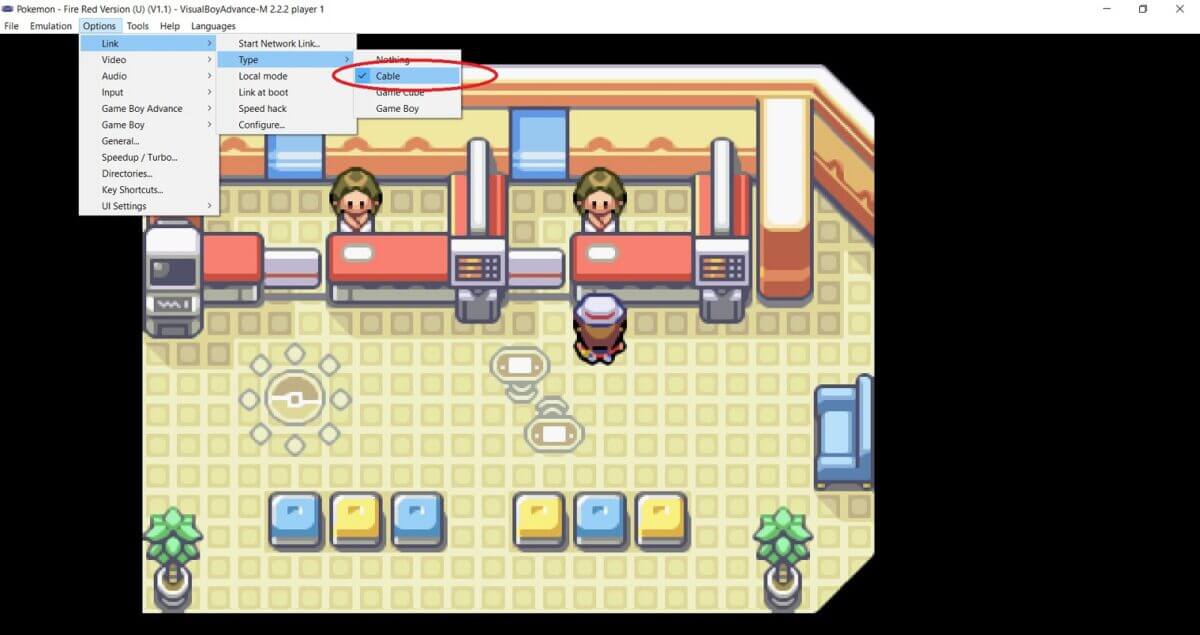
Set Link to Cable
This is probably the important one, since you need this for both VBAs to connect to each other. Go to Link, then Type, then click on Cable.
Pause When Inactive
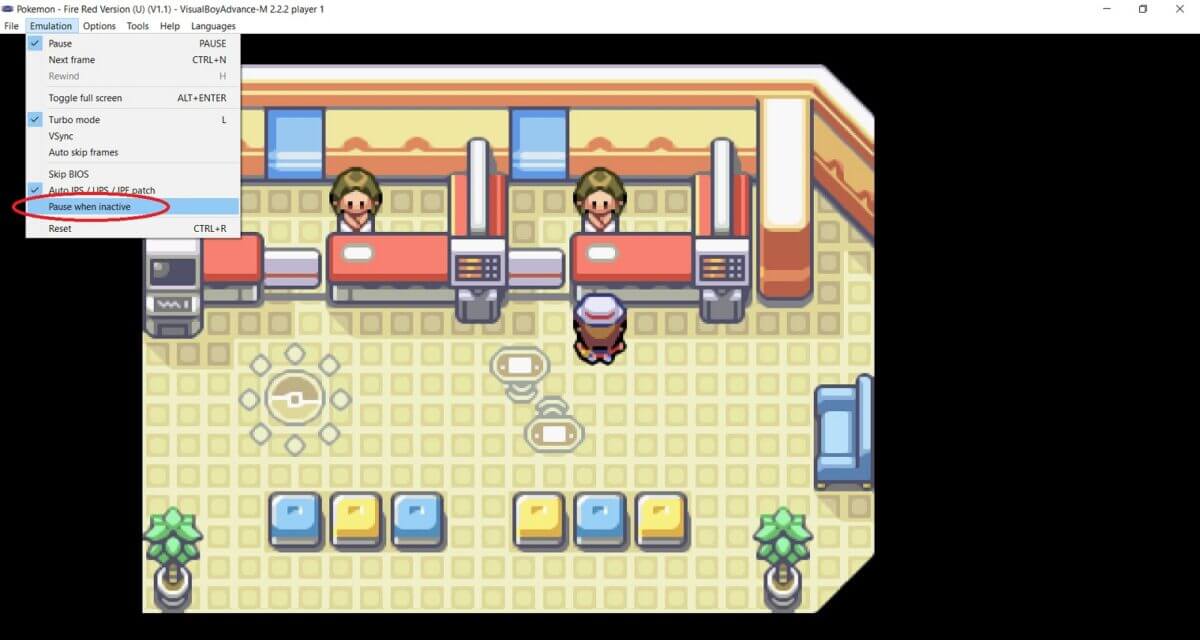
For this option, go to Emulation and make sure that the PAUSE WHEN INACTIVE is not checked. You would want this thing to be turned off.
When this option is turned on, whenever you ALT + TAB out of the emulator, the game will automatically pause.
That’s not a big deal, but when we get to the part where we are trading, you can only use one VBA at a time. When you ALT + TAB to the other one, it will pause.
When this option is off, both will move continuously, which will make trading easy and fast.
Mute Both Emulators
This isn’t a big deal, but it’s convenient to just mute both of them. That way, you don’t have to deal with the music as you’re switching between emulators.
How to Trade Pokemon in Visual Boy Advance, a Step-by-Step Guide
These are the steps involved in the actual trading process. For the left image, we will be using Pokemon FireRed. The one on the right will be Pokemon Ruby.
We’ll be trading two games that aren’t the matching pair.
Also, just to brush through it, your characters have to be at the Pokemon Centers where the trading will happen. It is on the second floor and has a specific NPC for trading, as you will see below.
Launch both emulators, load the save files, and follow the steps.
Step 1: Talk to the NPC to Initiate the Trade
Start talking to the NPC and select the TRADE option. The game will ask you to save, so do so, and the characters will enter the trading room once both games are ready.

Step 2: Start the Trade Between the Two Games
Have both characters stay in front of the trading station. Just click confirm on all sides to start the trade.

Step 3: Choose Any Pokemon to Trade
In this part, just choose which Pokemon you want to trade. Click on Trade to move on to the next section.

Step 4: Finalize the Trade
When you’ve chosen the Pokemon to be traded on both sides, just click on Yes, and the trading will begin.

Step 5: Trade Is Completed
Once the trade is completed, the games will automatically save.

Step 6: Exit When You’re Done
You can trade again if you want to, but if you’re done, just end the trading. Have one of the characters exit the room, and you’ll be set back outside with the connection on both emulators ending.
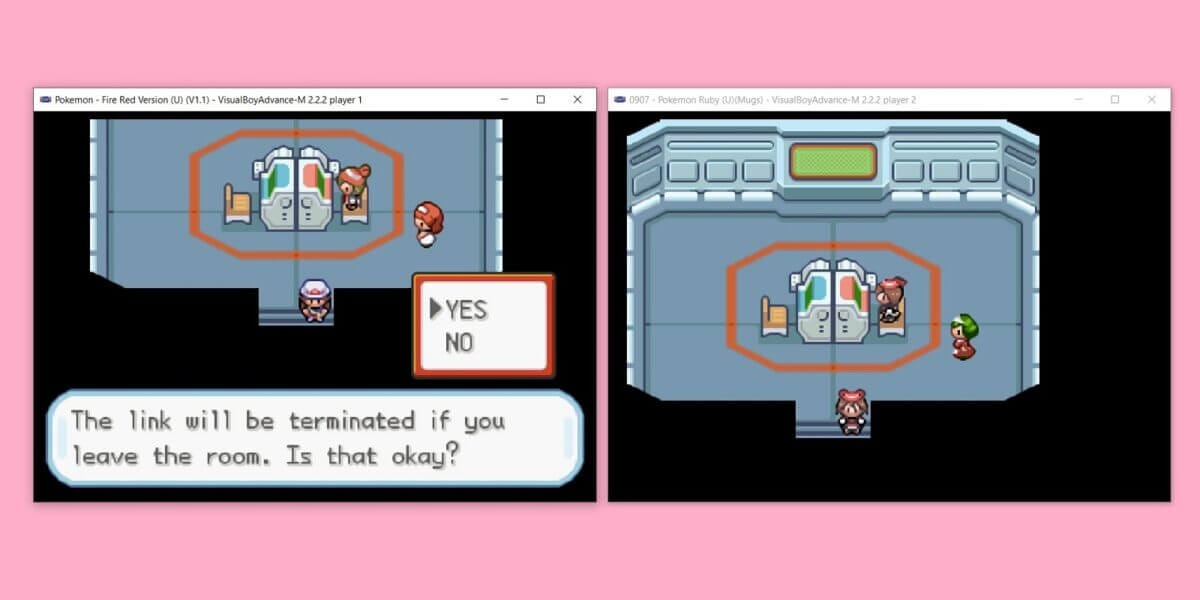
So, that’s it! How easy it is to trade a Pokemon using Visual Boy Advance if you have followed the steps mentioned above carefully.
Frequently Asked Questions
Are there potential issues of doing this?
We haven’t found it yet. As long as all trading rules and conditions are followed, you can trade freely. If you follow all the settings and steps, there shouldn’t be any issues.
Perhaps older versions may have issues, but the latest VBA emulators do not.
Can you trade between ROM hacks?
This one depends on the type of game and hack. For the main games, they cannot trade with ROM hacks.
There are some ROM hacks that can trade with each other. However, you’ll have to do a test first.
In Closing
It is possible to trade by yourself, especially now that you know how to trade Pokemon in Visual Boy Advance. It is fun to do this when you want to get those legitimate runs.
There are alternatives where you can just use cheats. Use a Pokemon Modifier cheat to get the Pokemon that you want.
Of course, there’s nothing wrong with using cheats, but it’s always welcome when you know other methods, especially the traditional ones to execute these. Speaking of cheats, we highly recommend using Visual Boy Advance if you’re a PC user, it works well with cheats and it has proven for many long years.

how many minutes does it takes to initiate trading on the waiting time? mine doesnt work right away