

Welcome to our guide on one of the most popularly used cheats from our Pokemon Emerald cheats collection, the rare candy! As a Pokémon Trainer exploring Hoenn, you are likely eager to learn how to enhance your team’s power and unlock their full potential.
You can get many benefits when applying this cheat. Rare candies are a valuable item that, when used strategically, can significantly accelerate your Pokemon’s level and growth.
But before diving into the codes, let’s first talk about the pros and cons of rare candy cheats in your Pokemon Emerald game.
Pokemon Emerald Rare Candy Cheat Pros and Cons
The Pros
By using the rare candy cheat, you can quickly level up your Pokemon, making them stronger and unlocking new moves and evolutions with ease.
This shortcut can save you countless hours of training, allowing you to focus on other aspects of your adventure.
As the name suggests, the rare candy is rare, not only in Pokemon Emerald but in every Pokemon game. This precious item gives you a chance to evolve and increase the level of your Pokemon without effort.
Related:
- Pokemon Sapphire Cheats – GameShark Cheat Codes for Game Boy Advance
- Pokemon Fire Red Cheats – Gameshark Codes, Game Boy Advance
- Pokemon Ruby Cheats – GameShark Cheat Codes for Game Boy Advance
The Cons
However, relying too heavily on rare candies can lead to an imbalanced team. Your Pokemon may not gain the same stats and EV (Effort Values) that come from regular battles and training sessions, which could hinder their performance in more challenging battles later on.
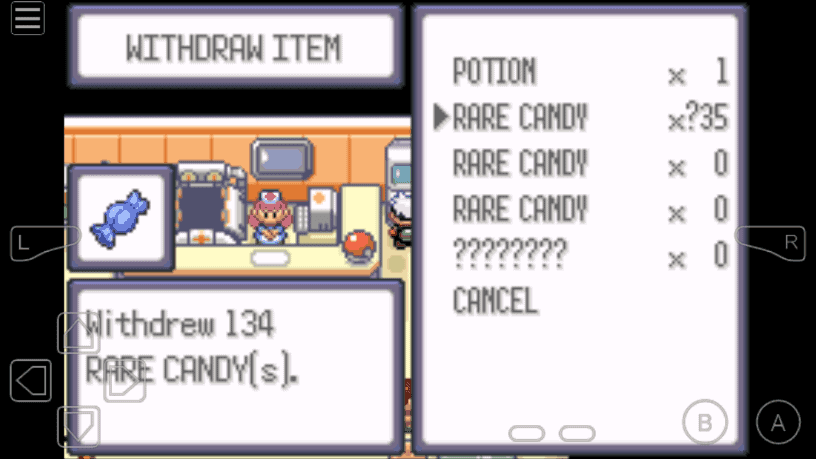
Another drawback you may encounter when using the cheat is; it populates your PC with bundles of rare candies, which in the long run is not useful.
Youtube Video: Pokemon Emerald Rare Candy Cheat Works for My Boy, John GBA, VBA, and GBA4iOS
When improperly used, this will cause problems with your PC or bag.
Best practices
Fortunately, there’s a way to prevent rare candies from populating your PC. All you have to do is turn off the cheat after use or after withdrawal.
Keeping the cheat activated even when not being used will just produce rare candy bundles. This safety method applies not only for the rare candy cheat but also to all cheats, cheat codes aren’t safe when they remain enabled when not used.
Rare Candy Cheat Code for Pokemon Emerald
| Rare Candy (Check PC) | Alternative (Check PokeMart) |
|---|---|
| (Action Replay/GameShark) BFF956FA 2F9EC50D | (Code Breaker) 82005274 0044 |
How to Activate and Use the Rare Candy Cheat in Pokemon Emerald
- Step 1: Grab the code above and enter the cheat in your emulator. Make sure that your GBA emulator has a cheating feature, and select the appropriate cheat type. We recommend using Myboy for Android users, Delta Game Emulator for iOS users, and VBA for Windows users.
- Step 2: Go to PokeCenter and check your PC to see and withdraw the rare candies. For the alternative cheat, go to PokeMart and purchase the first item in the buy list. The item will turn into rare candy.
- Step 3: Check the rare candy in your bag and give it to your Pokemon
Use the code to gain rare candies in your Pokemon Emerald game. You can try the alternative code if the first code fails to work.
For those who are asking where the master code is, please note that it is not required for this cheat.
Conclusion
The rare candy cheat for Pokemon Emerald is very useful when used correctly, and when paired with cheats such as Walk Through Walls or Master ball, your game couldn’t be more fun and memorable.
As always, if you are having trouble activating the cheat or have questions, be sure to leave it in the comment section below.

Hi, my name is JJ, I tried it and it works, I was happy and when I turned it off and checked my PC again. It’s still there and I’m thinking if it’s normal because it’ll be great if it disappeared.
Hello JJ, and welcome to Pokemoncoders! If you’re referring to an item you received from the item cheat, don’t worry, that’s completely normal. Just be sure to disable the cheat immediately after you get what you need. This is an important step to prevent any future glitches or issues with your game.
Does this cheat work in RetroHub?
Hi Arjun, I’m sorry, but we haven’t tested any of our cheats on RetroHub yet. I searched the emulator, but I couldn’t find any information about their cheating feature. However, if an emulator supports GameSharks or Action replay cheat codes, the cheats should work. Additionally, to make most of these cheats, I recommend using Emerald V1.0 or the Trashman version. I hope this helps.
Neither codes are working for OpenEmu… I have v. 1.0 of Emerald and use + to separate the lines of code. Also pressing L+R isn’t working either. Am I missing something?
Unfortunately OpenEmu is unreliable when it comes to cheating. Don’t get me wrong, it’s an excellent emulator, but you can’t rely on its cheating feature. I recommend switching to mGBA if you wish to use cheats.
the codes i am given do not work. can you please give me codes that work please?
thanks…
The codes should work, please make sure you have the recommended GBA emulators for cheating. I recommend using MyBoy if you’re on Android, VBA or mGBA if you’re on PC. For Mac users, I recommend mGBA.
When I use the PC option and withdraw rare candies it deletes my other items, as if it were transforming them into the rare candies.
Yes I’ve seen that where other items in your PC dissappear. You need to save first before using the cheat, then use it just once and then you must turn it off and even delete it. Then open the pc and collect them. If everything is ok Save again then repeat. If it hasn’t go back to your previous save point
Using the cheat multiple times in one go or a more common mistake, just leaving it on and active when you go to look in the PC for them can and will cause your other items in your PC to dissappear especially those at the bottom of the list including valuable ones. It might take a lot longer this way especially if it is only giving you say 16 each time you do it but it’s better than losing items like Leftovers etc
Hello, maybe you can help me…
I have an old Thrustmaster action Replay (only 12 digit) on my GBA with pokemon emerald, I found that codebreaker codes for shiny and encounters work, but this one and the master ball one (82005274 0xxx) doesn’t, I don’t understand why… I go to the pokemart and see no difference.
Can you help me please ?
I specify that my Replay action requires me to enter a master code, here is the one I put : 00006FA7 000A
1006AF880007
This the one I use for wild encounters.
thank you in advance, i’m desperate !
Hi Nadou, when going to Pokemart, simply purchase the first item in the buy list, and it will turn into Masterball. You can also watch the video guide here https://www.youtube.com/watch?v=HEOny5GWGns. Let me know how it goes to you.
If the code doesn’t work, try inputing it as Action Replay rather than Gameshark. It didn’t work in the mgba emulator before I did that.
After trying many times. It works just try you don’t need a Master code
Thank you for the tips pal. Sometimes, trying it multiple times will work.
Good afternoon! Inputting these into the mGBA Cheats page and saving them does not work at all. Are these codes compatible with the mGBA emulator?
Hi Dick Grayson, thanks for coming here. I had that experience with mGBA as well. If you are sure to have the v1.0 Emerald rom version and you’re using Windows, I would suggest using Visual Boy Advance. VBA is popular that works well with cheats. Hope this helps.
I use the Visual Boy Advance Emulator but can’t get the cheats to work as they are “invalid codes” or something…
can someone tell me if this works with retroarch?
Hi there HereiTristan. Yes, this works on Retroarch.
It works on Pokemon emerald just try and try( cheat name: Rare Candy code:BFF956FA 2F9EC50D)
idk how to do it i am using webrcade
The codes are actually the wrong way around…
82005274 0044 is for the PokeMart
and BFF956FA 2F9EC50D is for the PC
Hi Peeenos, thanks for the heads up. I already fixed it.
Can I use this emulator and cheat with my iPhone… if not can somebody point me in the right direction… or if there a way to do this chest with entering codes… just a glitch maybe
Hello
Hi there Dally.
I’m not sure on why but the PC cheat isn’t working for me but I’ve tried it in the bast but it’s worked, same emulator. Myboy
Yeah bro mines too… I tried both cheat and checked twice but still it doesn’t work… I’m using my boy
Here’s a trick that could potentially be the fix. Try going in and out of the pokemart’s door about five times while the cheat is enabled, and then check the PC.
The two codes are reversed. The code under pc is actually PokéMart and vice versa.
Yes Britt and I already made the changes. Thanks for letting me know about it.
I used the Shop code, and every shop does not sell it. Im using the VBA-m 2.0.1 and I’m not sure if Im doing it wrong
Both of the codes doesn’t work
I’m using JOHN GBA emulator
Hi Cani, have you tried switching to MyBoy? This works well with cheats.
Using mGBA emulator, on a 1.0 version of the rom, and the pc code does not work. The PokeMart code works but it costs 4800 which I can’t pay for early game. Help?
I had the same experience as you when I used mGBA, I suggest switching to another emulator if you really want this cheat. You can go with VBA https://www.pokemoncoders.com/visual-boy-advance-download/ or retroarch.
The codes are backwards, the first one is for the mart and the second is for the PC
I already fixed it. Thanks for the heads up Tatsuo.
does it work on play emulator?
Hey man, what do you mean play emulator? Perhaps it’s a new emulator?
I used both codes they both don’t work
I dont know where to put the code
You might need to switch to another GBA emulator. Use Myboy for Android or VBA for PC.
I am sure it is the right code I did everything master code
The rare candy cheat its, uhm
not working?
You have to buy the rare candies in the pokemart, after you enter the cheat code, go to pokemart and the first item will sell you rare candies for 4800p
acutally there is a master code for the rare candies in order to buy them from the mart you need to active the first one idk if it also is the other way around
Both didnt work
Check your Emerald rom version, make sure you have v1.0. Please note that v1.1 Emerald version usually don’t work with cheats.
I’ve looked everywhere possible and I can’t find a 1.0 emerald rom I can only find 1.1
Sorry pal, but we don’t share information about roms here.
that’s fine, i’ll continue my search then.
where is the adress value and description
I cannot see the rare candies in the PC why?
Which code did you use?
Your rare candy cheats didn’t work for me
why did u not tell what type of cheat code it is????? is it gameshark or codebreakers??????????????????????
What type of cheat code is 82005274 0044 and why doesn’t it work for Gameboy??
What type of cheat code is it so it can work
The cheat code is not workingl
It should work pal. You just have the correct rom version to make it work which is v1.0 and not v1.1. Which Emerald rom version are you using?
Im using a randomizer will it work?
Thanks for being here Paul. It will still work I believe.
The rare candy cheat for emerald is not working
bro did you alsow try the shop rare candy code
Does anyone know how to stop the rare candy code on emulator because they have taken up the entire pc
To prevent it from duplicating, you have to turn the cheat off after use. I think it’ll automatically replaced once you enabled another cheat.
Anyone have more cheat for this game please give me
004B for rare candy
I need more cheat for this game please give me if anyone have
hi guys i have the windows emulator mGBA and i’m trying to use the rare candy cheat for theta emerald ex but its not working. all other emerald cheats work tho
any thoughts?
Go to your PC and withdraw the rare candies or worst case, maybe mGBA simply doesn’t support the cheat.
I use a mobile emulator. It keeps telling me both codes are invalid. The emulator does in fact support gameshark codes, but this very code doesn’t work. I have to replace the spaces with “+” because the emulator told me to do that for multi-line codes.
Its work but my one pokemon becamed bad egg anyways that was lv1 Pokemon thanks
Make it sure to disable all other cheats except for this one and as much as possible, restart your game after disabling cheats.
can you use the codes for an actual gameboy an were do you go to enter the code
Hi Eric, you need emulator to use cheat codes. We use MyBoy for Android or VBA on PC, these emulators works smoothly with cheats in our own experience.
it does not work in my boy pro emulator
I’m afraid you need v1.0 for the cheat to work. Your emulator works well with cheats but you need the right rom version which V1.0 to make it work.
Code isn’t working! And on another site it’s saying buy. I’m playing pokemon emerald enhanced rom hack and when I talk to the mart person after “how may I serve you?” The usual mart item list doesn’t even open or anything.
And I’m using john gba emulator
Does this work on rom hacks like Pokemon emerald multiplayer alpha 4 v2
THE CODES WORK, BUT ARE SWITCHED AND THEY ARE NOT CODEBREAKER THEY ARE GAMESHARK V3 IN MY EMULATOR, ANYWAY THANKS A LOT FOR THE ULZTIMATE CHEAT.
I believe the first cheat is code breaker and the second one is Gameshark v3. Anyway, I’m happy to know that the codes worked out for you. Thanks for visiting pokemoncoders.
My emulator only accepts cheats with master codes can you make a rare candy cheat with one
Could you please tell me which GBA emulator is it that you’re using?
John GBA isnt working
These codes are wrong and carelessly entered by the site. Neither one works. Not the PC and not the shop.
First of all, all cheats listed in this website requires a V1.0 rom version to work. If it didn’t work to you most likely you have v1.1
Funny how the codes work the only problem is that you put the codes in the wrong parts of the description cause the pc code is the poke mart one and the poke mart code is the one for the pc
It doesn’t work on the pc and I am using fire gba which is actually awesome
only for emerald version and it only works with the visual boy advance not the beta version its the other one with the latest date
or at least thats the best free one
So for me the codes were reversed. The first one worked for the PokeMart and the second worked for the PC
no =_=
nothings working tried both. none work and everything is staying normal. am I supposed to use the master code?
Those are the only code you need. If none of them works then I suggest checking your cheat type. Try codebreaker or Action replay if your gba emulator doesn’t support cheat type detection. Or maybe you have the V1.1 emerald? Cause this version will not work for cheats.
the codes can be reversed, it what happens for me
Wow working
The alternative code doesn’t work, but the first one does, it’s just that it isn’t in the Item Storage for me, it’s actually in the PokeMart
You cheat codes made my pokemon game crash we i did the deoxys cheat nobody should use the cheat codes that they show, that’s all i have to say about my complaint.
Both don’t work
Kindly check your rom version, if it is v1.1 then most likely the cheat will not work. The cheat this v1.0 rom.
Didn’t work for emerald but the top one worked in leaf Green perfectly. Are there any other ways to obtain rare candies or are these the only cheats?
The cheat codes work perfectly for Emerald, see link for the full list of Pokemon Emerald cheat codes.
Both of the cheats don’t work I tried the first one it said invalid. The second one worked but it said nothing to withdraw
If it says invalid more likely the entered code is incorrect. I suspect there is a space at the end of code which causing the issue, double check the code and remove the space. The code 82005274 0044 works for me.