

Classic Pokemon games have a unique charm that always keeps us coming back, even with Nintendo spitting out new releases faster than ever. But we also know how painfully slow some moments in Pokemon can be.
Especially those long training sessions, breeding, and shiny hunts. That’s when mGBA’s fast-forward feature comes in handy. It allows you to skip the boring parts and spend less time on grinding and more on enjoying your adventure.
This guide will teach you how to speed up the mGBA emulator and give you the most convenient hotkeys you never thought you needed, so you can have the best mGBA experience.
More emulator guides from Pokemoncoders:
- How to Use Cheats in mGBA: A Complete Tutorial
- Best GBA Emulators for Pokemon Gaming
- 5 Best GBA Emulators for Cheating
- Best Emulators for Playing Pokemon GB/GBC Games
Reasons for Using the Fast-Forward Feature in mGBA

If you are a fan of Pokemon games, ROM hacks, and even cheats, then fast-forward would be your best friend. Besides save states, it’s probably the most used feature in mGBA.
Here are the best times to use fast-forward to make the most out of it:
- Grinding Levels: If you want to speed up your grind for levels without using any cheats, the fast-forward button can be a legitimate way to do that.
- Egg-hatching: Eggs require a certain number of steps to hatch. Turn on fast forward and run around in Mach 20, and your egg will hatch in no time.
- Skipping Text: Yeah, reading Professor Oak’s speech in the intro for the 10th time doesn’t seem very entertaining. But thanks to fast-forward, you can skip dialogues like these.
- Shiny Hunting: Don’t even get me started on how many resets it takes to find a single shiny Pokemon. Fast-forwarding will speed up the process by decades.
- Faster Travel: Those long tunnels and far destinations feel like a thousand miles, especially if you don’t have Fly yet. Thankfully, fast-forwarding can speed up the journey. Set it to 2x (4x max) only because going too fast and going past your turns or entering houses accidentally may delay you more.
How to Speed Up mGBA Emulator
I discovered fast-forwarding on mGBA by accident, and since then, I haven’t been able to play without it.
This tutorial is the best way of how to speed up the mGBA emulator and the most efficient hotkeys for a streamlined experience:
Fast-Forward Toggle vs. Hold
There are two fast-forward options in mGBA:
Fast-forward Toggle
This allows you to press one button to turn on fast forward or turn it off. Press it once to speed up the game, and press it again to go back to normal speed.
This is great for dialogues, shiny hunts, level grinding, and if you want your overall gameplay to be faster.
Fast-forward Hold
Fast-forward only works when you hold a certain button. Once you let it go, the game will return to normal speed.
This is great for traveling because you can just let it go in crossed paths or if you want to enter a building. I also use this when healing up at a Pokemon Center. Sorry, Nurse Joy.
Mapping Fast-forward Buttons in mGBA
The default controls and hotkeys aren’t very efficient. If you want a quick and easy way to speed up your gameplay so you won’t be scouring for buttons in-game, you can just copy my fast-forward hotkeys. Here’s how:
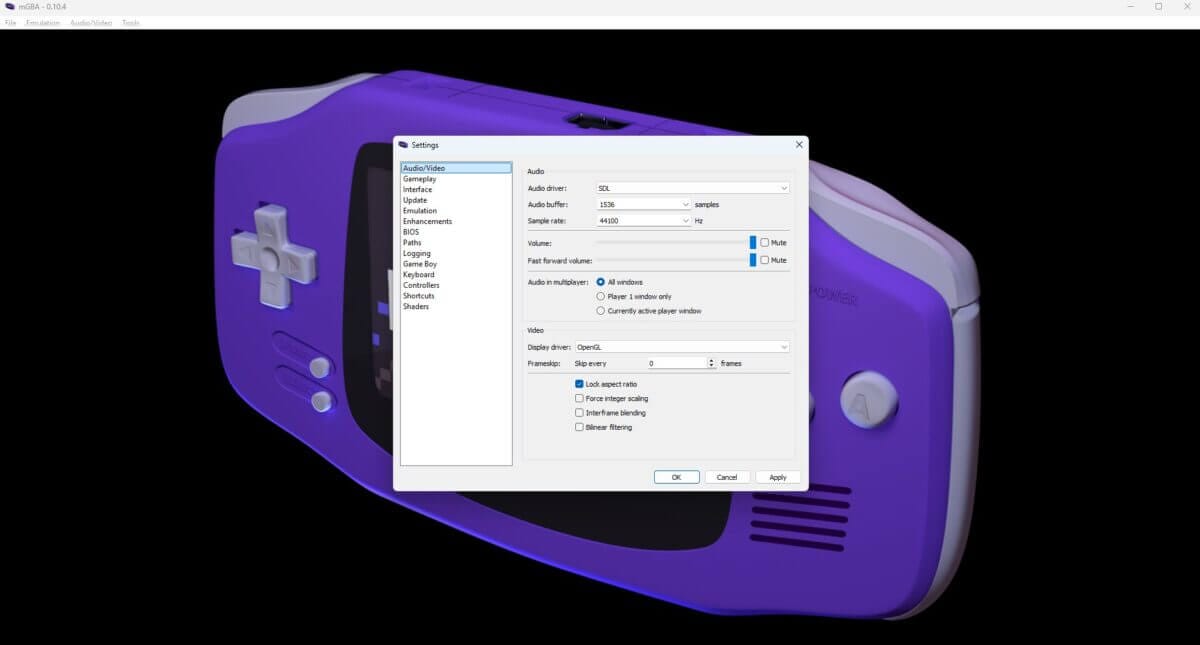
Step 1: Open mGBA Settings
First, launch mGBA on your PC. Then, go to Tools and click on Settings.

Step 2: Locate the Shortcuts Tab
Look for the Shortcuts tab. Click on it and you’ll see mGBA’s wide array of useful shortcuts for settings, quality of life, and extra features. Go to Emulation next.
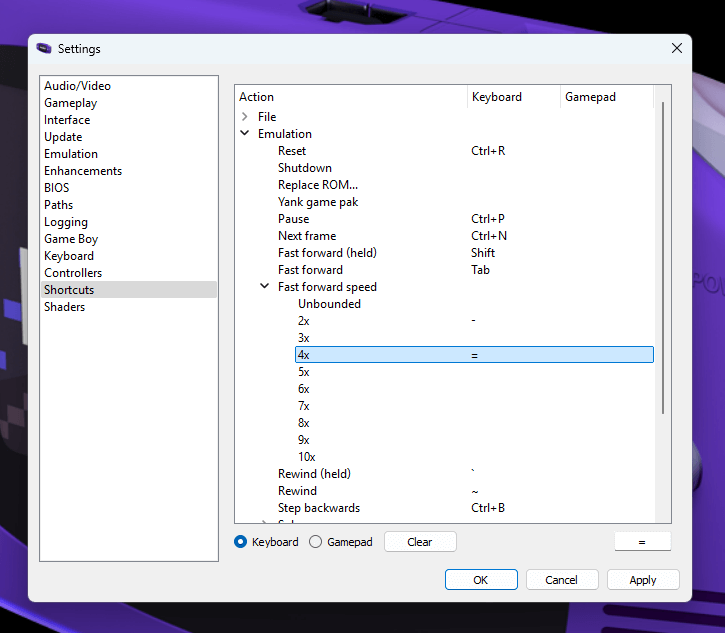
Step 3: Assign Your Hotkeys
Don’t get overwhelmed by these settings. We need only these:
Keyboard:
Fast-forward (Switch): LShift – Great for PC gamers since LShift is universally used for speeding up or sprinting in most PC games.
Fast-forward Hold: Space bar – You can easily access the space bar with both your thumbs, and you can use WSAD or arrow keys to move.
Alternative:
Fast-forward (Switch): Tab – For those who use Space as their A button.
Fast-forward Hold: LShift – Same reasons as above.
I also set my fast-forward speed hotkeys on my keyboard. Assign 2x to “-” and 4x to “+.” This lets you easily switch between fast-forward speeds for different situations.
Controllers:
Fast-forward (Switch): Left Shoulder – Easy access but prevents misclicks, unlike other free buttons.
Fast-forward Hold: Right Shoulder – Left hand is for movement. Triggers are for L and R. The right shoulder lets you hold fast-forward and frees up your thumb for the A and B buttons.
Conclusion
mGBA is the king of GBA emulators for a reason. It’s packed with useful and convenient features that make coming back to GBA games all the more enjoyable.
The fusion of nostalgia and tech advancement makes it impossible for classic Pokemon to be boring.
Now you know how to speed up the mGBA emulator, set those hotkeys, start using the fast-forward option, and see how it enhances your GBA experience.
