

If you’ve tried using PKHeX, then you’ve probably already seen the dreaded red warning icon that marks your Pokemon as illegal.
Most of the time, this is caused by a Pokemon having incorrect moves, impossible stats, or mismatched encounter details.
Fixing this manually can seem like rocket science, especially if you’re a beginner in save file editing.
That’s where the Auto Legality Mod (ALM) comes in. This plugin automatically fixes your Pokemon’s data and converts it into a legal version that matches in-game rules.
In this guide, I’ll teach you how to install and use the Auto Legality Mod in PKHeX step by step.
Key Highlights:
- The Auto Legality Mod is a PKHeX plugin that removes the red warning icon and makes your Pokemon legal with one click.
- To install the plugin, download ALM that’s the same version as your PKHeX and place the mod file inside the Plugins folder you created in your PKHeX directory.
- You can legalize existing Pokemon in your save or automatically create a legal one. No need to manually edit PIDs, IVs, or encounter data since the mod handles everything automatically.
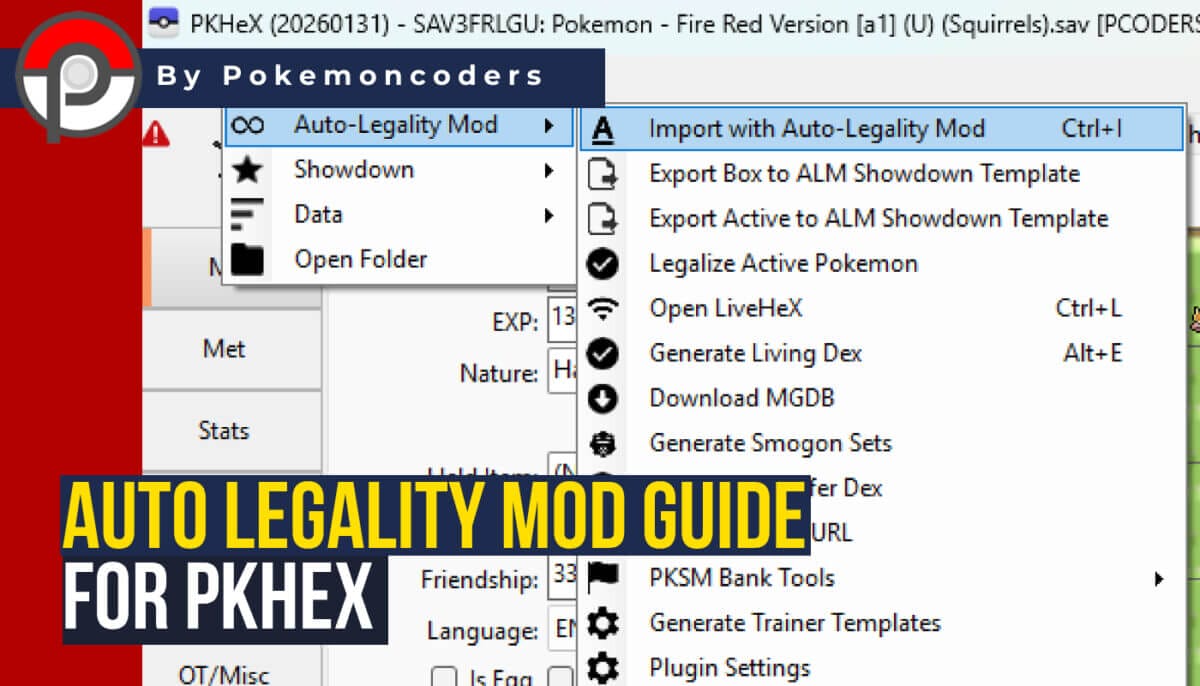
What Does the Auto Legality Mod Do?
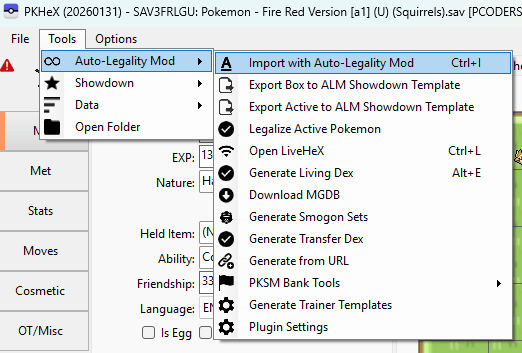
Auto Legality Mod is a plugin for PKHeX that automatically adjusts a Pokemon’s data so it becomes valid and doesn’t contradict the game’s rules. That means you don’t need to manually edit the following info:
- Pokemon IDentification number (PID)
- IV combinations
- Encounter data
The mod does everything for you with a single command. Well, except for movesets. You need to add moves yourself.
When to Use the Auto Legality Mod in PKHeX?
The Auto Legality mode is super helpful if you:
- Created a Pokemon from scratch.
- Edited a Pokemon incorrectly.
- Imported a Pokemon that shows errors.
How to Install Auto Legality Mod in PKHeX
The Auto Legality Mod is a one-click solution, but installing it can be another problem in itself if you don’t know the exact steps.
Unlike other programs or plugins, this mod can’t be downloaded directly from the PKHeX interface. Here’s a step-by-step guide on installing the Auto Legality Mod.
Step 1: Create a Plugins Folder for PKHeX
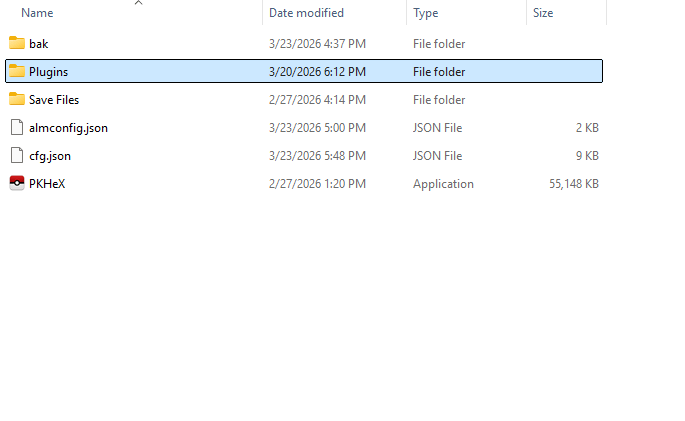
PKHeX doesn’t have a folder for storing plugins by default, so you’ll have to create it manually. Go to your PKHeX folder.
Then, create a new folder named “Plugins.” This is where your Auto Legality Mod files should go. Make sure PKHeX is closed before proceeding.
Step 2: Download Auto Legality Mod
Next, you need to download the Auto Legality Mod that’s the same version as your PKHeX.
You can check your PKHeX version by launching the app or looking at your PKHeX folder’s name. They need to be the save version; otherwise it won’t work.
Step 3: Extract and Put Inside the Plugins Folder
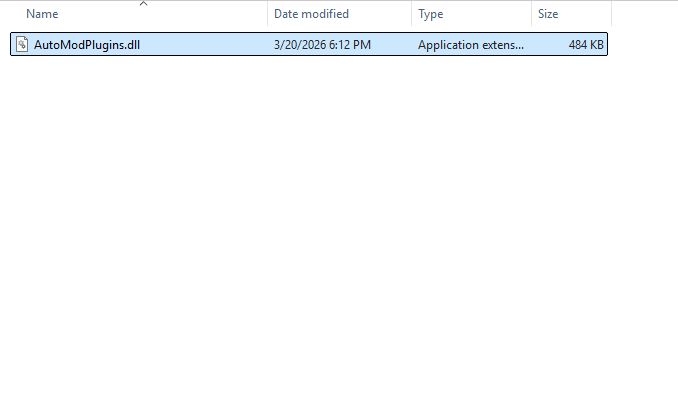
After downloading successfully, unzip the content of the file. It should be an application extension with the file name “AutoModPlugins.dll.”
Copy this file and paste it into the Plugins folder you created in your PKHeX directory. Launch PKHeX and click on Tools to check if it has successfully detected the new plugin.
PKHeX’s logo also changes color, indicating that it has been modded.
How to Use Auto Legality Mod in PKHeX
Now that you have Auto Legality Mod installed, let’s go through how to actually use it in a simple and practical way.
This section focuses on the basics so you can start using it right away for your mainline Pokemon games.
Now, I’ll assume that you already know how to use PKHeX and modify your save files using this tool. But if not, we have a complete beginner’s guide for PKHeX here at Pokecoders.
Legalizing a Pokemon using ALM
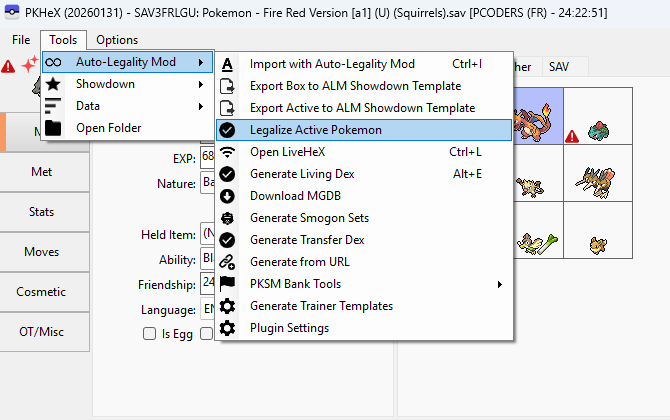
The most common use of the Auto Legality Mod is fixing one Pokemon at a time.
Start by opening your save file in PKHeX. Then go to your Box or Party tab and right-click the Pokemon you want to fix. Click View to load it into the editor.
If the Pokemon shows a red warning icon, that means it has illegal or invalid data.
To fix it, go to the top menu and click the following:
Tools -> Auto Legality Mod -> Legalize Active Pokemon
Upon accessing the Legalize Active Pokemon section, the mod will automatically adjust the Pokemon’s data. This includes things like encounter details, moves, IV combinations, and other hidden values.
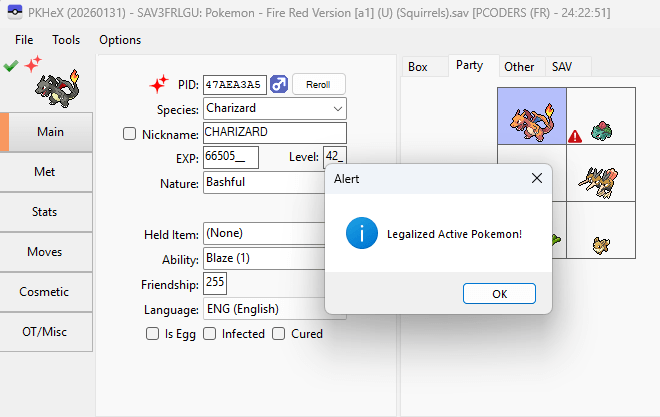
After that, check the icon again. If everything worked, the red warning should turn into a green check mark, meaning the Pokemon is now legal.
Make sure you drag that new legal Pokemon back to your party or box. Most beginners forget about this step and end up with a still-invalid Pokemon.
Importing a Legal Pokemon
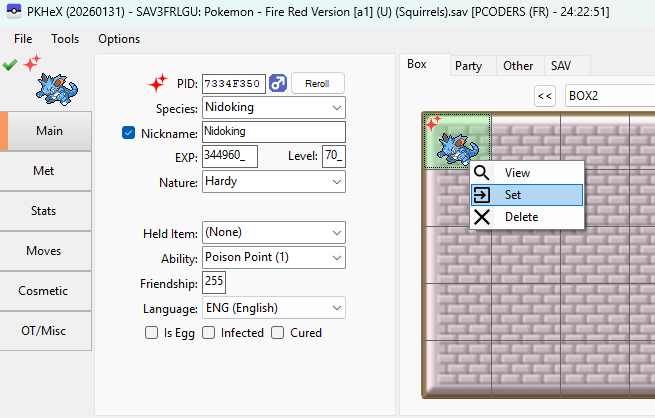
Another useful feature is importing a Pokemon and automatically making it legal at the same time.
Instead of manually editing every detail, you can:
- Right-click an empty slot in your box.
- Click “Set” and choose a Pokemon.
- Then, go to Tools -> Auto Legality Mod -> Legalize Active Pokemon.
The mod will recreate the Pokemon using valid in-game data so it will appear like it was obtained normally.
This is the fastest way to create legal Pokemon for your personal playthrough.
Keep reading:
- How to Use PKHex for Nuzlocke Challenge: The Information You Want to Know
- How to Fix the Pokemon Name Glitch After Using Cheats
- How to Fix Cheats That Stay Active After Disabling in Pokemon GBA, GBC & ROM Hacks
Conclusion
The Auto Legality Mod is designed to make things easier, not more complicated. As long as you follow basic steps, you can safely create and fix Pokemon without worrying about hidden errors.
Once you have it installed and get used to it, you’ll be able to build entire teams in minutes while keeping everything clean and functional for your game.
If you encounter any issues or hiccups while using this legalization mod, please don’t hesitate to ask for help in the comments below.
Our team at Pokecoders will be more than happy to assist you and make sure your process is as smooth as possible.

This mod is useless. It doesn’t let you keep nor generate perfect ivs.